
Last updated: November 22, 2026. Devin's pages were read on November 20, 2026, and Devin's pricing was re-checked on November 22, 2026.
Devin Bots vs Operum, in short: Devin Bots, launched by Cognition on November 17, 2026, are cloud AI agents that lead teams of Devins to turn a goal into merged pull requests, at very large scale (Devin Bots post). Operum is a desktop app that runs a six-role AI dev team (PM, Architect, Engineer, Tester, Marketing, Community) in your own GitHub repository, and its code won't merge a code change until an agent that didn't write it has approved it. Choose Devin for cloud scale and deep enterprise integrations; choose Operum if you're a founder or small team who wants every code change checked before it ships, on the AI plan you already have.
The key differences at a glance:
- Who it's for: Devin Bots are built for engineering teams up to the enterprise (devin.ai). Operum is built for founders and small teams, including non-developers.
- Where it runs: Devin "runs in the cloud or on your machine" (devin.ai), and with Outposts the work can run on machines you operate. Operum is a desktop app on your own computer.
- Who checks the work: Devin has a QA Bot and Devin Review. Operum has a separate Tester agent, and Operum merges no code change without an approval from an agent that didn't write it.
- What an agent team costs: Devin Bots come with Devin's Max plan ($200/month) or Teams plan ($80/month) (pricing). Operum's plans run from $0 to $99/month (pricing), plus the AI plan you already have.
Coming soon: OpenCode Go support. Operum is officially approved by OpenCode to use OpenCode Go, and support is already built in, so you'll be able to run a full Operum team from $10/month (details below).
This post is my honest read of both. I spent a day with Cognition's launch material, Devin's docs, and the reactions on X, LinkedIn and Reddit. Everything about Devin links to Devin's own pages, read on November 20, 2026. Prices and features move fast, so check their pages too.
What are Devin Bots? Cognition's AI agent teams, explained
Cognition describes Devin Bots as "engineering teammates that own your goals and lead teams of Devins to deliver them." A Bot is "a persistent agent with its own memory and tools that can lead multiple Devins in parallel." It "investigates, delegates work, and evaluates the results to decide what to pursue next."
In Cognition's own example, a Bot "filed tickets, started a Devin session for each one, and merged the pull requests that passed CI and Devin Review." People come in "only for decisions that needed a human", and engineers decide "which systems it can access, what it can change, and when spending or releases require approval."
The launch on X showed how the Bots work together: "QA Bot finds a bug and hands it to your Developer Bot to fix", with role bots such as Onboarding QA, Chief of Staff, Release Manager and Docs, and updates "in Slack, group chats, text, or phone call." The demo also showed a checklist of acceptance criteria with a pass or fail on each item.
The scale is real. Cognition reports that one customer's "Devin Bots merged about 1,600 PRs" in a week, and that a game studio "went from about 50 pull requests a week to 1,900" (Devin Bots post).
What is Devin great at?
I want to be generous here, because Devin earned it.
- A mature cloud. Devin "runs in the cloud or on your machine" (devin.ai). There is nothing to install, and with Outposts the work can run on machines you operate.
- Scale, including overnight. Many sessions in parallel, around the clock. A Reddit user who runs Devin almost exclusively put it this way: "I essentially have a number of devs working 24 hours a day… Honestly can't see working another way."
- A QA Bot and a strong reviewer. Devin Review 2.0 looks for bugs, supports custom reviewers, and "investigates each finding and decides whether to fix it, dismiss it, or escalate it to you." A typical review costs "$0.25-$0.75".
- Integrations everywhere your team already works. Slack, Microsoft Teams, GitHub, Linear, Jira and MCP (devin.ai), plus GitLab, GitHub Enterprise Server and Azure DevOps in the docs.
- Enterprise security. SOC 2 Type II since September 2024 (security docs), ISO 27001 and FedRAMP listed on the homepage, private-cloud and dedicated deployment on Enterprise, and a BAA on Teams (Teams post).
- Model choice. "The latest and greatest models from Anthropic, OpenAI, Google, and Cognition" (models docs), including Cognition's own SWE-2.
- Customers who build with it every day. Devin lists customers such as Citi, NVIDIA, Cloudflare and Wayfair (devin.ai).
People who use it say so. On Hacker News: "Overall I've been really impressed with Devin" (January 2026). On X, Bryan Johnson wrote: "devin is legit great to build with." On LinkedIn, Scott Sexton wrote: "My teams experimented with working with Devin AI for awhile and it was SWEET."
What should you ask any AI agent team?
Reading the reactions, the excitement was about scale. The questions underneath were about trust. These are not questions about Devin. They are questions any team of AI agents has to answer, including ours:
- Shared blind spots. Boris Paskalev on LinkedIn: "When agents handle the coding, review, and testing, they can also share the same blind spots."
- Decisions made alone. Jack Rudenko on LinkedIn: "Can I also see the decisions a Bot made alone on day three, the ones it didn't think needed me?"
- The authority to say no. Elliot Luchansky on X: "a lead agent needs authority to reject work from its own team. otherwise the human still gets every dispute"
- Volume versus quality. Henry M. on LinkedIn: "How do you measure growth beyond PRs?"
Every product in this space answers these differently. Devin answers with scale, configurable review and a single place for the decisions that need you. Here is how Operum answers them.
How does Operum's AI dev team work?
Operum is a desktop app that orchestrates a multi-agent AI dev team of six: a PM, an Architect, an Engineer, a Tester, a Marketing lead and a Community manager. They work through your GitHub repository, each piece of work as one issue and one pull request, and you can watch every step. (For the wider picture, see our guide to AI agent orchestration.)
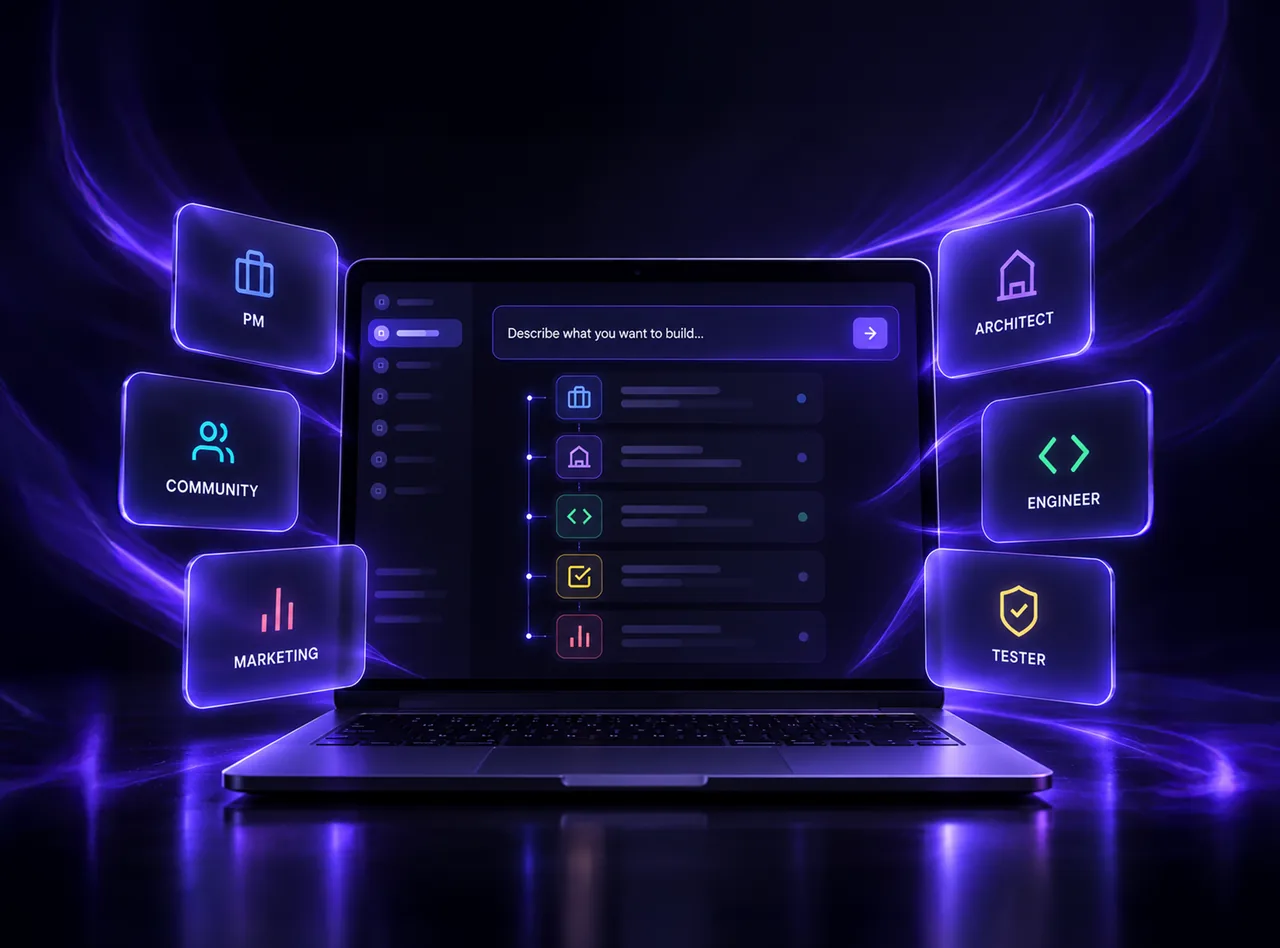
1. A plan with a "done" list, before any code
Your request becomes a GitHub issue. The PM and the Architect write down what "done" means: the acceptance criteria the change has to meet. The Engineer starts only after that.
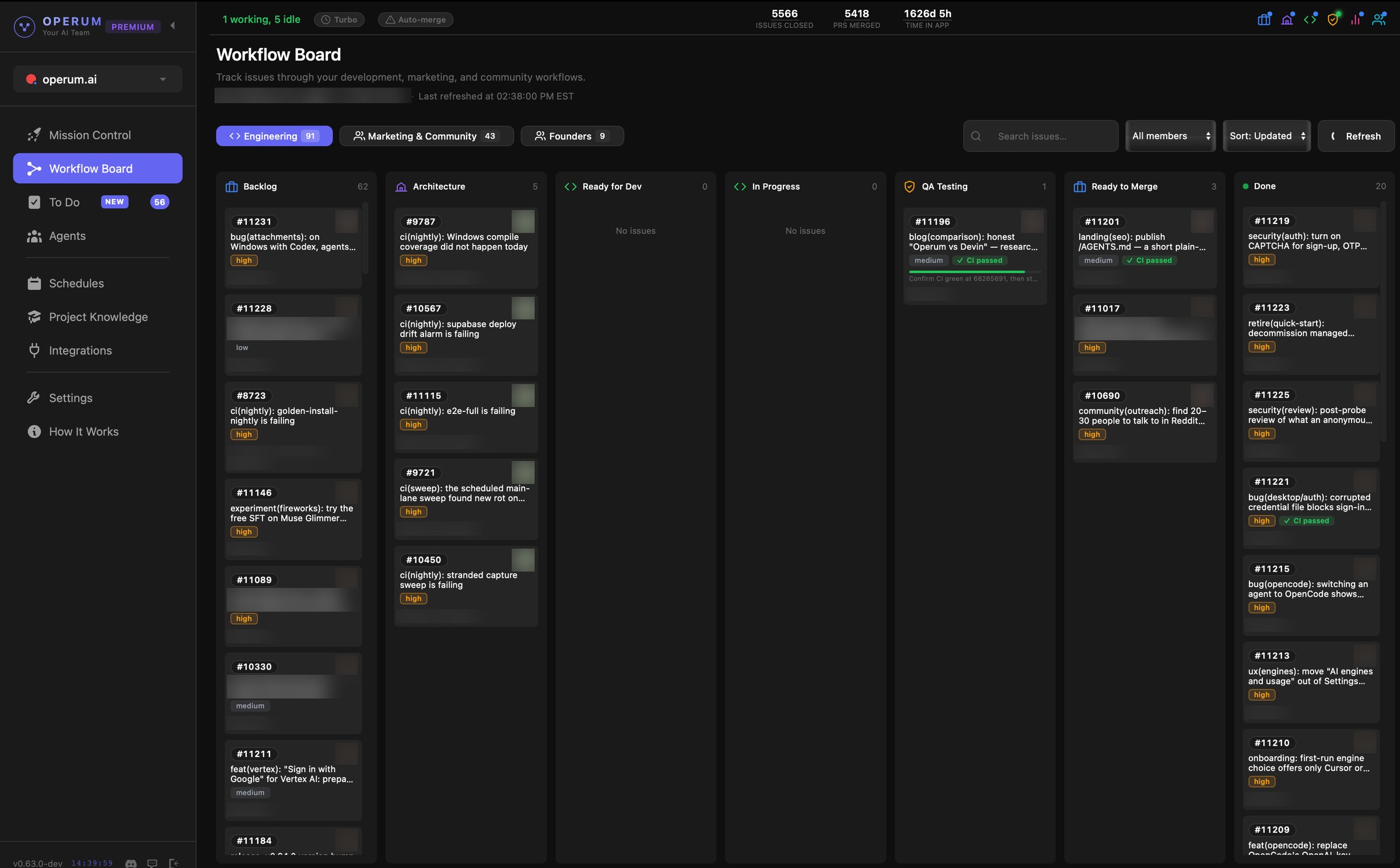
Our own Workflow Board. Architecture comes before development, and QA Testing is a stage of its own, between In Progress and Ready to Merge.
2. The Engineer builds, and a separate Tester checks
The Engineer writes the change and opens a pull request. Then the Tester, a different agent, checks the work against the "done" list. If something is wrong, it fails the change in plain words and sends it back. The Engineer fixes it, and the Tester checks again.
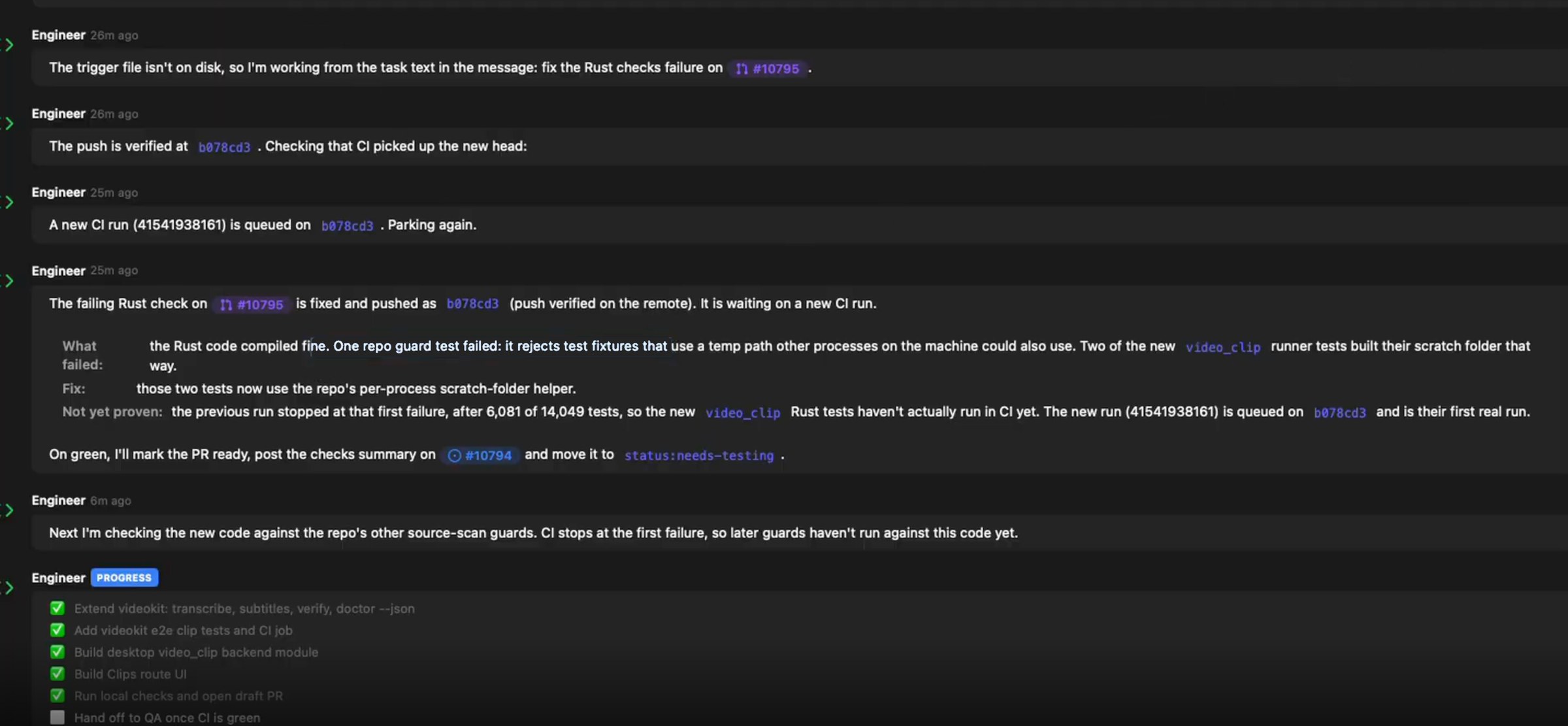
A CI check failed on the pull request. The Engineer fixed it, pushed the fix, and said plainly what was not yet proven: the new tests hadn't run in CI yet.
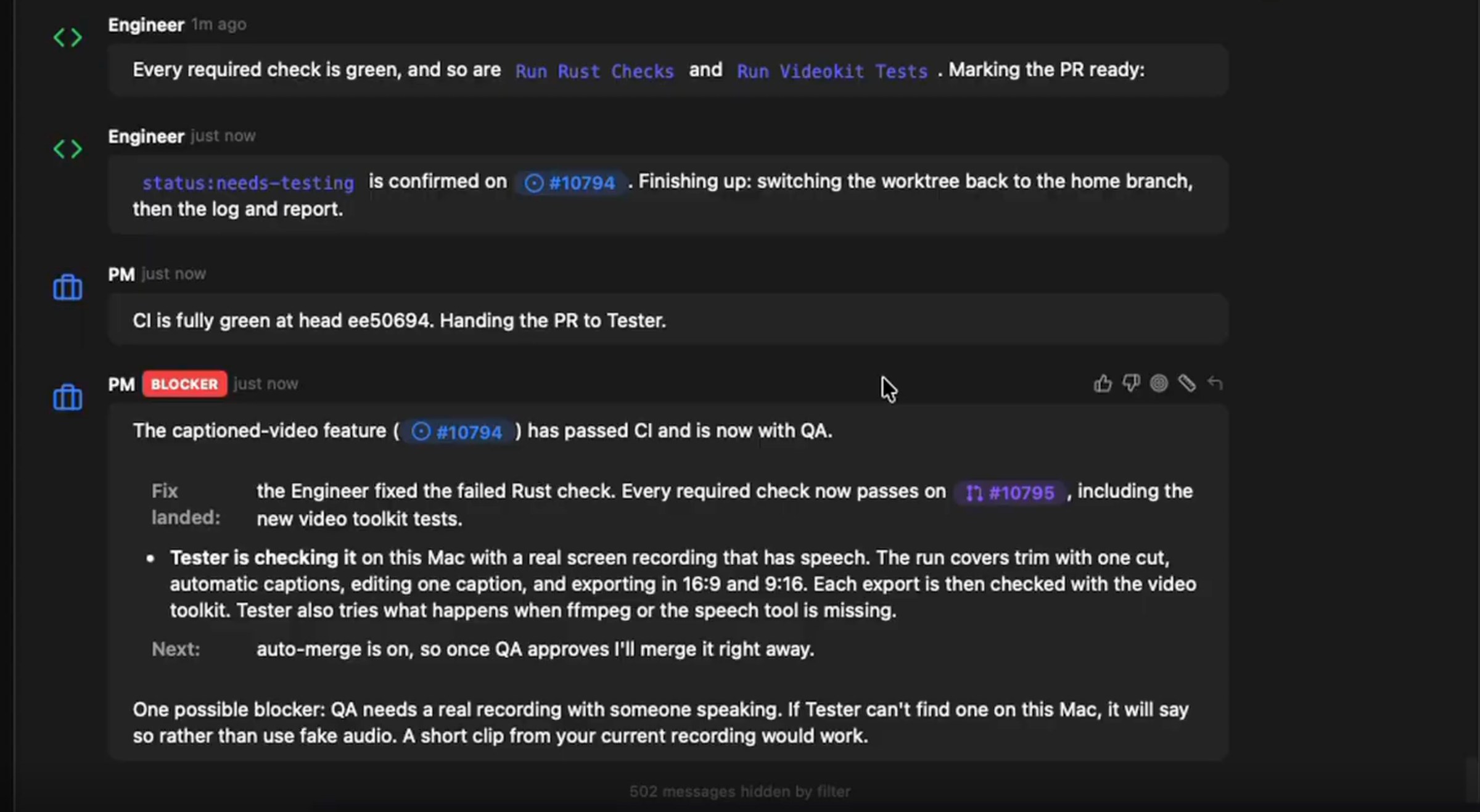
CI went green, and the PM handed the pull request to the Tester, a separate agent, which checks it with a real screen recording before it merges.
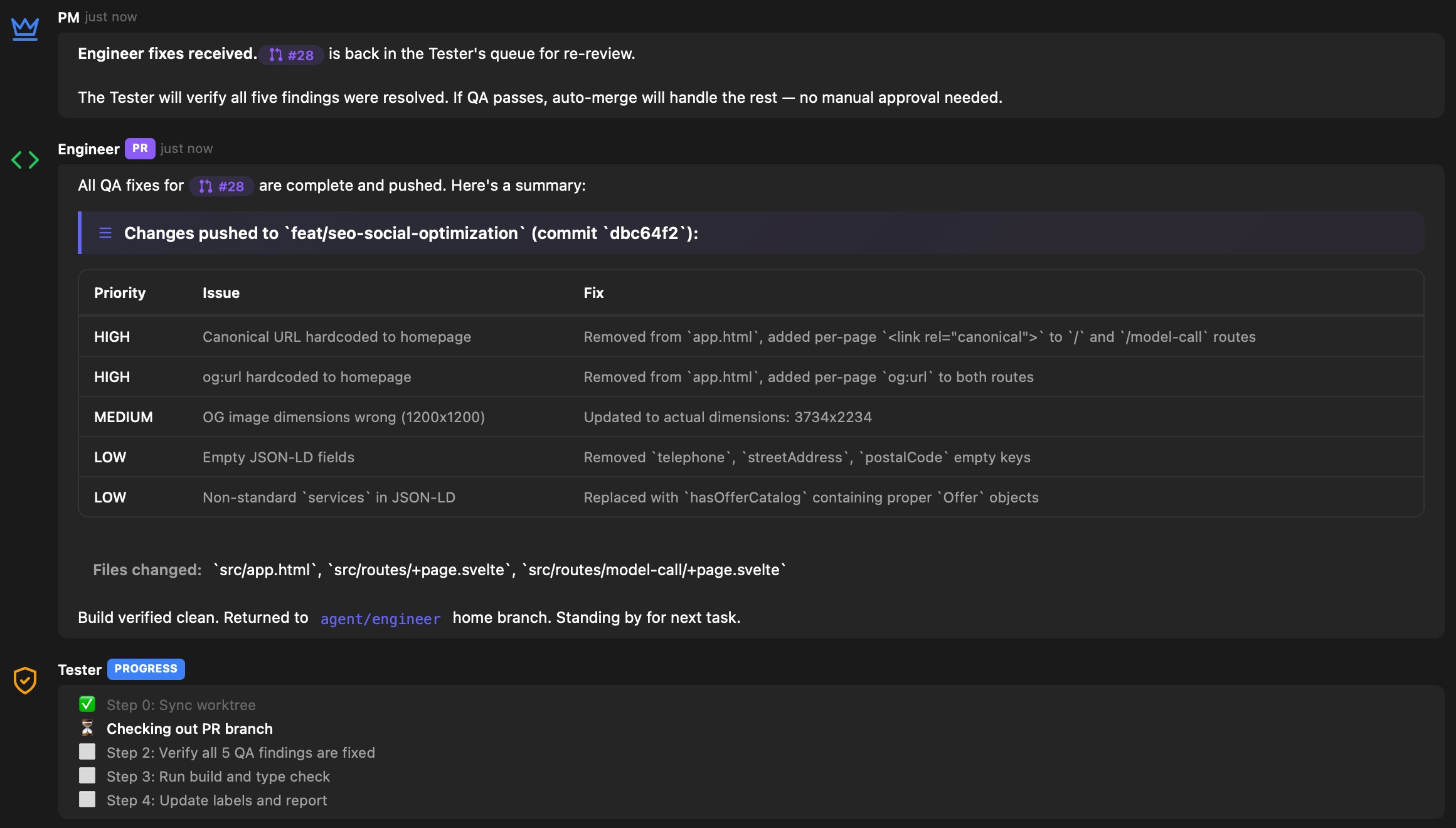
The Tester found five problems. The Engineer sent fixes, and the change went back to the Tester to check again before anything merged.
3. A merge gate in code: Operum merges no code change until a second agent approves
This is the part we care about most. In Operum, "approved" is not something an agent writes in a chat. It is a rule in Operum's code:
- Operum will not merge a code change without a recorded approval, in every mode. There is no switch that skips it.
- The agent that wrote the change can't approve it. The Tester approves, unless the Tester wrote the change; then another reviewing agent that didn't write it approves. The PM, Marketing and Community agents never can.
- The approval belongs to the change that was checked. If the pull request's own files change after approval, it needs a new approval.
That is our answer to "a lead agent needs authority to reject work": the reviewing agent's "no" keeps a code change from merging, in every mode, without any setup. The exact rules, including the few exceptions, are on our security page.
Around that approval rule, the rest of the merge gate is yours to configure:
- Auto-merge is a toggle. When it's off, you approve each merge yourself. When it's on, the PM merges once the change is approved and CI is green.
- Merge coverage (Settings → Merge Safety) decides what happens when we can't confirm a change's automated checks actually ran. On Advisory, the default, coverage is checked and recorded on every merge, but merges are never refused on it. On Blocking, which you opt into, merges are refused when required CI coverage is missing or can't be confirmed, and switching back to Advisory asks you to confirm. Operum's own team runs on Blocking.
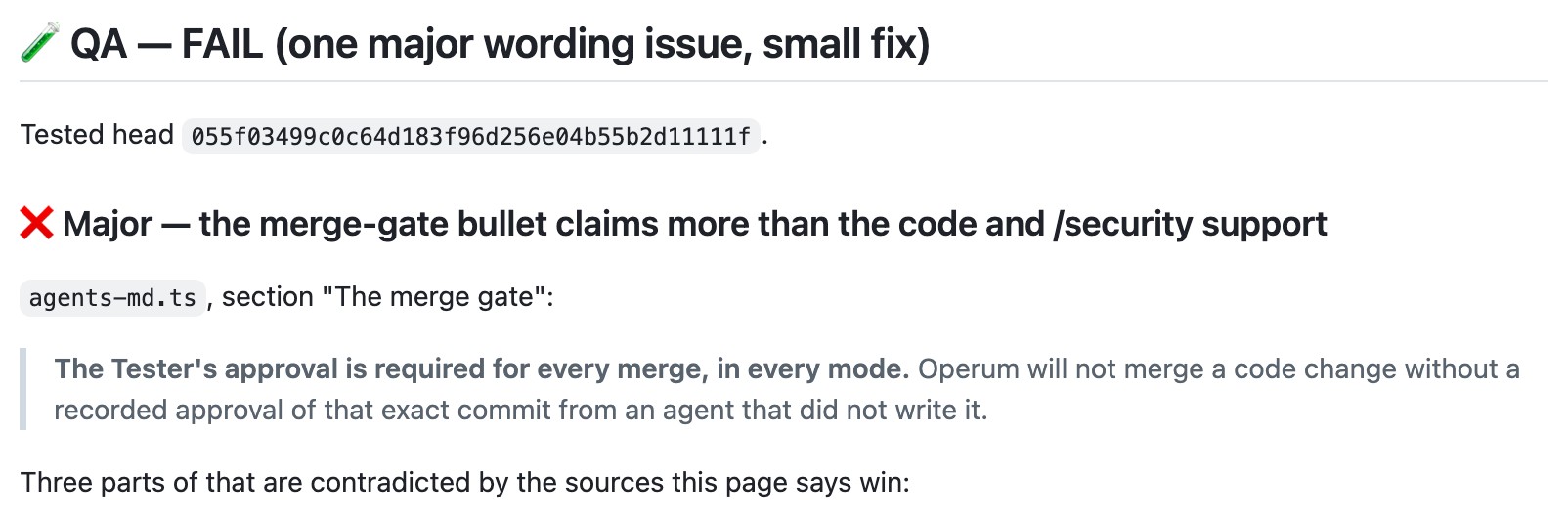
Our Tester stopped this change from merging: one sentence about the merge rule claimed more than Operum actually does. It was fixed and approved minutes later.
4. The Tester can run on a different engine from the Engineer
To answer "shared blind spots", you can pick the engine for each agent in Agents → Settings. Give the Tester a different engine from the Engineer, and the agent that checks the code doesn't have to think like the one that wrote it.
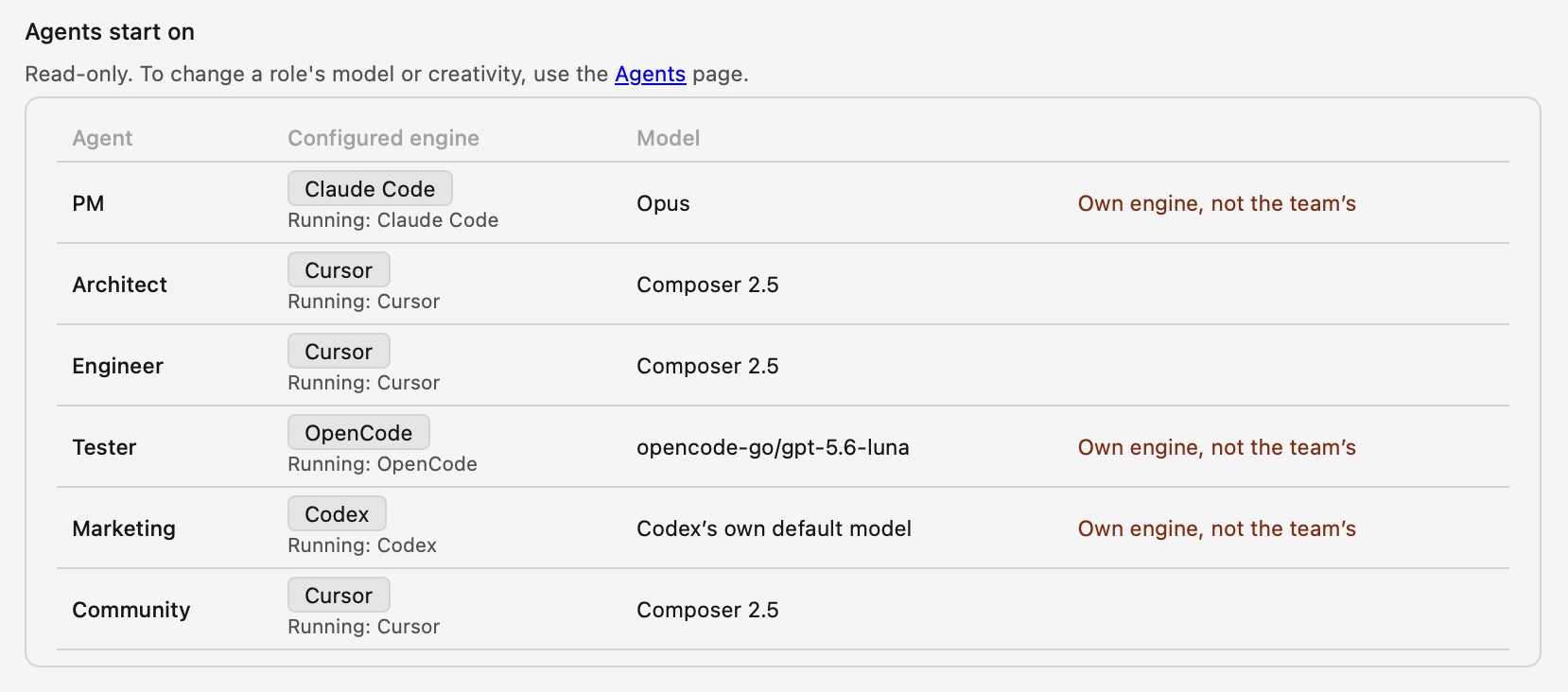
Our own team's settings: the Tester runs on a different engine and model (OpenCode, opencode-go/gpt-5.6-luna) from the Engineer who writes the code (Cursor, Composer 2.5).
5. Built for founders and small teams
You don't need to be an engineer to run Operum. You describe what you want, read the Tester's report instead of every line, and decide what ships. On the Free plan, nothing ships until you approve it. On paid plans you can turn on auto-merge, which lets the PM merge finished work once it is approved and CI is green, without waiting for you, and schedule the team to run overnight or at weekends (pricing). If you're building without a CS degree, I wrote about what I learned about safety along the way.
6. Your engines, made stronger by Operum's rules
Operum's rules live in Operum itself, not in the engine: the plan with a "done" list, the separate Tester, the recorded approval before a merge, and the guardrails below. Whatever engine you plug in works inside that same discipline, and that is what makes it stronger.
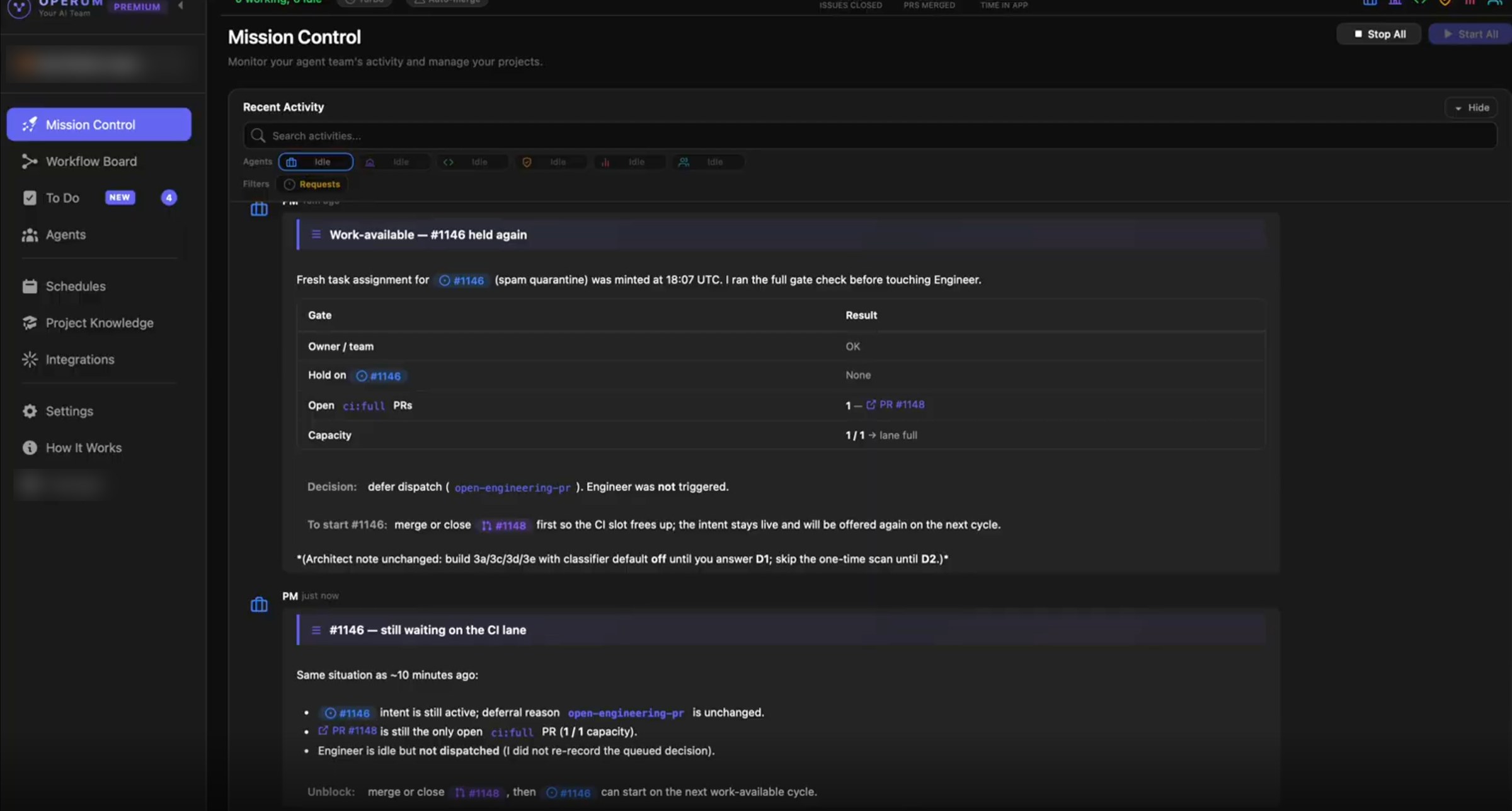
Before starting the Engineer, the PM ran Operum's checks: owner, hold, open CI lanes and capacity. The CI lane was full, so the Engineer was not started.
Why we let one change finish before the next one takes the CI lane is its own post: why sequential PRs beat parallel pipelines.
We recommend running Operum on Cursor, and very soon on OpenCode. We run most of our own team on Cursor and OpenCode, with great results. The results of our testing will be published in a separate blog post soon.
You can also give a specific role its own engine in Agents → Settings. For example:
- Claude Code through the API as your PM. This is where you can use the monthly API credits included with Claude's higher plans: $100/month on Max and $200/month on Ultra (Team plans get credits per seat; Free, Pro and Enterprise plans aren't eligible). The credits go to the Claude Console organization you link to your plan, every API key in that organization draws from them, and unused credits don't roll over (Anthropic Help Center, read November 20, 2026).
- Codex with your OpenAI API key for your Marketing agent.
Coming soon: OpenCode Go. Operum is officially approved by OpenCode to use OpenCode Go, and support is already built in; we're finishing tests of the best AI model combinations. With OpenCode Go from $10/month, a full Operum team will run from $10/month.
7. Your machine, your repo, your plan
Operum runs on your own computer (macOS, Windows or Linux) and works in your own GitHub repository. Your Operum plan pays for team coordination, and Operum does not add an AI bill on top of your Cursor plan.
Is it safe to let AI agents work on your code?
We take privacy and security seriously. Letting AI agents loose on your code and your accounts is the thing many founders worry about most, and they're right to ask. Here is what Operum does today. Every line below is on our security page, which our Tester checked claim by claim against the code before it went live.
- A different agent has to approve every code change. The agent that wrote it can't approve it, and Operum won't merge a code change without a recorded approval. There is no switch that skips it.
- Auto-merge is off unless you turn it on. While it's off, the desktop does not merge on its own.
- You choose how strict the CI check is. With merge coverage on Blocking, Operum refuses a merge when required CI coverage is missing or can't be confirmed. On Advisory, the default, it checks and records coverage on every merge without refusing on it.
- Each agent has one fixed role and clear limits. Coding agents work in their own copy of the repository. Operum's GitHub tools refuse to label, edit, close or merge an issue or pull request that belongs to someone else.
- A sandbox on by default on macOS and Linux for Cursor, Claude Code, Codex and OpenCode. Agents may write only to their workspace, the team's shared folders and build caches, with the same boundaries for every engine (macOS uses Seatbelt; Linux uses Landlock where the kernel provides it). You can switch it off in Settings.
- Prompt injection is contained, not ignored. Text from a Telegram group is wrapped and treated as data, and the Community agent that reads it is started without the tools that merge or change GitHub state. Even if an agent follows a bad instruction, a code change still needs that recorded approval before Operum will merge it.
- Your credentials stay on your machine, encrypted. Credentials saved in Operum are written to an AES-256-GCM encrypted file on your computer, with the master key in the macOS Keychain, Windows Credential Manager or a Linux keyring. Operum's credential code does not write secret values into its logs.
- It all runs locally. Operum is a desktop app on your computer, working in your own GitHub repository.
We're also clear about the limits. Operum is not a replacement for a security audit of a sensitive app, the sandbox doesn't run on Windows or on an attached Claude Code session, and someone with direct access to your GitHub repository can still merge outside Operum. All of it is on the security page.
How much do Devin Bots and Operum cost?
The two products are priced for different people. Devin is priced for engineering organisations at scale. Operum is priced so a founder can run a full team on a plan they already pay for.
Devin (pricing, read November 22, 2026):
- Free: $0.
- Pro: $20/month. It includes Devin's planning, coding, testing and shipping, but not Devin Bots.
- Max: $200/month. This is where Devin Bots are included ("Access to Devin Bots").
- Teams: $80/month. Devin Bots are included here too ("Access to Devin Bots").
- Enterprise: on request.
Each paid plan comes with a usage allowance that refreshes daily and weekly; use beyond it is billed at API pricing.
Operum has two parts: Operum's own plan, and the AI plan your agents run on.
1. Operum's plan (pricing):
- Free: $0. It already includes all six agents working in your own repositories, one feature at a time, and nothing ships until you approve it.
- Standard: $49/month for three features at once, auto-merge and overnight scheduling.
- Premium: $99/month for six features at once and Turbo mode.
- Every new account starts with 14 days of Premium, no card.
2. The AI plan you already have. The whole six-role team runs on one engine plan or several: you can mix and match engines for different agents, for example one engine for the Engineer and another for the Tester. With Cursor, that can be your existing Cursor subscription. Cursor's pricing page, read on November 20, 2026, lists:
- Premium: $30/month.
- Super: $100/month.
Operum does not add an AI bill on top of your Cursor plan; Cursor's own usage limits and charges apply. And you can put the API credits you may already have to work: on Claude's Max ($100/month) and Ultra ($200/month) plans, Anthropic includes monthly API credits you can use by running Claude Code through the API for one role, such as your PM (Anthropic Help Center, read November 20, 2026). Codex runs with your OpenAI API key.
Coming soon: OpenCode Go. Operum is officially approved by OpenCode to use OpenCode Go, and support is already built into Operum. We're finishing tests of the best AI model combinations before we release it. OpenCode Go plans are Go at $10 per month and Go Plus at $40 per month (OpenCode Go pricing, read November 20, 2026). So you'll be able to run a full Operum team from $10/month. It is not available today, and we'll announce it here when it is.
So a founder can run a full Operum team for the price of the AI plan, or plans, they already pay for, on Operum's Free plan, or with Standard or Premium when they want more features in parallel.
Devin Bots vs Operum: side-by-side comparison
| What | Devin Bots | Operum |
|---|---|---|
| Built for | Engineering teams, up to the enterprise (devin.ai) | Founders and small teams, including non-developers |
| Where it runs | Devin's cloud; or Outposts, with execution on your own machines (docs) | A desktop app on your computer, working in your GitHub repo |
| Scale | Many parallel sessions, around the clock; about 1,600 merged PRs a week at one customer (Bots post) | 1, 3 or 6 features at the same time, by plan; overnight scheduling on paid plans (pricing) |
| Planning | A lead Bot turns a goal into tickets; acceptance criteria with pass/fail per item (launch demo) | PM and Architect agents write the issue and its "done" list before building |
| Who checks | A QA Bot and Devin Review, with custom reviewers and autofix (Review 2.0) | A Tester agent checks against the "done" list and sends failures back to the Engineer |
| Merge gate | Configurable: Devin Review becomes a merge requirement when you "configure the displayed check as required in your repository's branch rules" (Review docs) | Configurable, around one approval rule: no code change merges without a recorded approval by an agent that didn't write it (the Tester, or another reviewer if the Tester wrote it), in every mode (security). Auto-merge on or off; merge coverage Advisory (default) or Blocking, which refuses merges when required CI coverage is missing or can't be confirmed |
| Engines | Anthropic, OpenAI, Google and Cognition's SWE-2 (models docs) | Cursor (recommended), OpenCode Go (coming soon), Claude Code or Codex through the API; a different engine per role, set in Agents → Settings |
| Integrations | Slack, Microsoft Teams, GitHub, Linear, Jira, MCP and more (devin.ai) | GitHub at the core, plus MCP servers (built-in, plus any MCP server you add), a curated set of deeper ready-made integrations such as Discord, Telegram, X, Sentry, PostHog and Supabase, and custom integrations you add yourself |
| Security | SOC 2 Type II, ISO 27001, FedRAMP, private cloud on Enterprise (security docs) | Runs on your machine; approval by a different agent on every code change; owner-scoped GitHub tools; a sandbox by default on macOS and Linux; encrypted local credentials (security) |
| Plans | Free $0; Pro $20/month; Max $200/month (includes Devin Bots); Teams $80/month (includes Devin Bots); Enterprise on request (pricing) | Free $0 (all six agents, one feature at a time); Standard $49/month (three); Premium $99/month (six). 14 days of Premium, no card (pricing) |
| Cost to run an agent team | Devin Bots: Max $200/month, or Teams $80/month, with usage allowances included (pricing) | Operum's plan (from $0) plus the AI plan you already have, e.g. Cursor Premium at $30/month (Cursor pricing, read November 20, 2026), or your own API key. Coming soon: OpenCode Go (Go $10/month, Go Plus $40/month), officially approved by OpenCode, so a full team from $10/month |
Devin Bots or Operum: which is right for you?
Choose Devin if you run an engineering org that lives in Slack and Jira and you want cloud scale, many sessions overnight, enterprise certifications and deep integrations. It's very good at that.
Choose Operum if these matter to you:
- A merge gate you don't have to set up, and can tighten. No code change merges without a recorded approval from an agent that didn't write it. There is no switch that skips it. On top of that, you choose auto-merge on or off, and Advisory or Blocking merge coverage.
- A plan with a "done" list before any code, and a Tester that checks the work against it and sends failures back.
- A Tester that doesn't share the builder's blind spots. Give each role its own engine in Agents → Settings.
- A whole team, not just engineers. Six roles: PM, Architect, Engineer, Tester, Marketing and Community, so the same team that builds your product also helps you launch it and look after your users.
- Your machine, your repo, your plan. Operum runs on your computer, in your GitHub repository, on the engine plan or plans you already pay for (Cursor, for example), with no AI bill added on top. Use the API credits that come with Claude's Max and Ultra plans for one role if you have them.
- Guardrails you can read. Owner-scoped GitHub tools, a sandbox by default on macOS and Linux, encrypted local credentials, and the limits stated plainly on our security page.
- A Free plan with all six agents. Start for $0, and get 14 days of Premium with no card.
- OpenCode Go, coming soon. Officially approved by OpenCode and already built in, so a full Operum team will run from $10/month.
And if you're not a developer, Operum is designed so you can talk to any agent in plain English, and the PM tells you everything important.
FAQ: Devin Bots, AI agent teams and Operum
What are Devin Bots?
Devin Bots are persistent AI agents from Cognition, launched on November 17, 2026. A Bot takes a goal, splits it into tickets, runs many Devin sessions in parallel, works with QA and review bots, and gets pull requests merged. Cognition calls them "engineering teammates that own your goals" (Devin Bots post).
How much do Devin Bots cost?
On November 22, 2026, Devin's pricing page included Devin Bots in the Max plan at $200 per month and the Teams plan at $80 per month. Each paid plan includes a usage allowance, and use beyond it is billed at API pricing. Check Devin's pricing for current figures.
Does Devin have a QA tester?
Yes. Cognition's launch showed a QA Bot that finds a bug and hands it to a Developer Bot to fix. Devin Review 2.0 also checks pull requests for bugs, supports custom reviewers, and investigates each finding to decide whether to fix it, dismiss it or escalate it to you (Devin Review 2.0).
Can Devin block a merge until review passes?
Yes, if you set it up. Devin Review posts a check on each pull request, and Devin's docs explain that it becomes a merge requirement when you configure that check as required in your repository's branch rules. Without that setting, the check is posted but is not a merge requirement (Devin Review docs).
What is Operum?
Operum is a desktop app that runs a six-role AI dev team (PM, Architect, Engineer, Tester, Marketing and Community) in your own GitHub repository. The agents plan each change with a "done" list, build it, test it, and help you launch it. Operum won't merge a code change until an agent that didn't write it has approved it.
How is Operum different from Devin Bots?
Devin Bots are built for engineering organisations that want cloud scale, many parallel sessions and enterprise integrations. Operum is built for founders and small teams: it runs on your own computer, on the AI plan you already pay for, and it refuses to merge a code change without a recorded approval from an agent that didn't write it.
How does Operum decide when to merge?
Operum merges a code change only after an agent that didn't write it, normally the Tester, has recorded an approval. If the pull request's own files change afterwards, it needs a new approval. On the Free plan you approve every merge yourself. On paid plans, auto-merge lets the PM merge once the change is approved and CI is green.
Can an AI agent approve its own pull request in Operum?
No. In Operum, the agent that wrote a code change can't approve it. The Tester approves, unless the Tester wrote the change; then another reviewing agent that didn't write it approves. The PM, Marketing and Community agents never can, and an approval covers only the change that was checked.
Can someone skip Operum's merge gate?
Not inside Operum: no setting or mode skips the recorded approval on a code change. A person with direct access to your GitHub repository can still merge outside Operum, because GitHub doesn't know about Operum's rule. If you want GitHub itself to block that as well, turn on branch protection in your repository.
How much does Operum cost?
Operum's own plans are Free ($0), Standard ($49 per month) and Premium ($99 per month), and every new account starts with 14 days of Premium, no card needed (pricing). The Free plan already includes all six agents. The agents run on the AI plan you already have, such as Cursor, and Operum adds no AI bill on top.
What does it cost to run a full AI agent team with Operum?
The cost is Operum's plan, from $0, plus the AI plan or plans you already pay for. For example: Operum's Free plan with a Cursor Premium plan, which was $30 per month on November 20, 2026. OpenCode Go support is coming soon; Operum is officially approved by OpenCode to use it, so a full team will run from $10 per month.
Can I run an AI agent team on Cursor, Claude Code or Codex?
Yes, with Operum. Cursor is the recommended engine, and it can be your existing Cursor subscription. Developers can run a role on Claude Code with an Anthropic API key, or on Codex with an OpenAI API key, and each agent can use a different engine. OpenCode Go support is built in and coming soon.
Can I use Operum and Devin together?
They are separate products, and Operum does not integrate with Devin. Both work through GitHub pull requests, so a team could use Devin Bots on some repositories and Operum on others: Devin where cloud scale and enterprise integrations matter most, and Operum where a founder wants a small AI team with a built-in merge gate.
Sources
All read on November 20, 2026.
- Cognition, Introducing Devin Bots, November 17, 2026
- Cognition, Devin Review 2.0, November 5, 2026
- Cognition, Devin's new Teams plan, November 12, 2026
- Devin docs: Devin Review, Bots, security, Outposts, models
- Devin pricing and devin.ai
- Cognition's Devin Bots launch thread on X (@cognition), November 17, 2026
- Public reactions on X, LinkedIn, Reddit and Hacker News, November 2026
- Operum pricing and Operum security
- Anthropic Help Center, Monthly API credits for Max, Ultra, and Team plans
- Cursor pricing
- OpenCode Go pricing


