
Part 1 of 14 in my series, Golden rules of vibe coding. Published November 22, 2026.
Rule 1, in short: the easier it becomes to build, the more important it becomes to know what is worth building. Before your first prompt, answer four questions: why you're building it, who it's for, what the smallest useful version is, and how you'll know it worked. AI made code cheap, but it didn't make building the right thing cheap. When you skip the "why" and the "who", the AI fills the gaps with its own guesses, and you can spend weeks of prompts on a polished app nobody needs.
Why do vibe-coded apps end up with no users?
You can get a working app in an afternoon now. That's exactly why this rule comes first. When code is fast, the expensive mistake moves upstream: the question is no longer "can I build it?" but "should I build this, and for whom?"
It usually sounds like one of these:
- "I built an app and nobody uses it."
- "The AI keeps building the wrong thing."
- "I've been prompting for weeks and I'm not sure what I'm building anymore."
All three have the same root. The AI will happily help you build anything. It doesn't know who your user is unless you tell it, and it never asks whether anyone needs the app at all.
What does Harvard research say about AI and building?
Karim R. Lakhani studies exactly this. He is the Dorothy & Michael Hintze Professor of Business Administration at Harvard Business School, co-founder and faculty chair of the HBS AI Institute, and founder and co-director of the Laboratory for Innovation Science at Harvard (HBS AI Institute).
On July 27, 2026, he opened the Open and User Innovation Conference with a talk called "Democratizing Innovation, Again?". The HBS AI Institute's write-up of the talk frames the problem in a way I find very useful for vibe coders. Innovation has always needed two kinds of knowledge: users know what they need, and the expertise to build a solution is costly to get. In the write-up's words, "AI weakens the second constraint without eliminating the first." Building gets easier; understanding the real problem does not.
The write-up highlights one line from Lakhani:
"Selection is now going to become a bottleneck." (Karim R. Lakhani)
When anyone can produce a credible solution, the hard part is choosing which ones are worth pursuing. The write-up lists practical questions that come with that: reliability, because AI can make incorrect answers sound convincing; evaluation, because evidence about whether an innovation works can arrive much later; and the risk that AI outputs converge on similar ideas, which threatens the variety that breakthroughs come from.
This is research, not a slogan, and it cuts both ways:
- AI really does lower the cost of expertise. "We now have evidence that generative AI is lowering the cost of expertise," Lakhani said on Microsoft's WorkLab podcast in April 2025.
- It can stand in for some teamwork. In a field experiment with 776 professionals at Procter & Gamble, "individuals with AI matched the performance of teams without AI" (The Cybernetic Teammate, NBER working paper, 2025; Lakhani is a co-author).
- It can also make you worse. In earlier research by Lakhani and colleagues, on analytical tasks beyond the AI model's capabilities at the time, people using AI performed roughly 20% worse, as the HBS AI Institute summarises it. Lakhani and his collaborators call that uneven edge of AI's abilities the "jagged technological frontier."
So the point isn't that only humans can find problems. It's that AI made the building part cheap much faster than it made the choosing part easy. Knowing what is worth building is still your job.
Why does the AI build the wrong thing?
An AI coding tool turns what you write into code. When the goal is vague, it still has to decide everything you left out: who signs in, what the main screen shows, what matters most. It decides by guessing, and it guesses a little differently every session.
So a vague goal becomes vague code. "Build me a booking app" gets you a generic booking app. "A booking page for my photography clients, who book a consultation from their phone and today email me back and forth for days" gets you something much closer to what you need, because the AI now knows who it's for and what problem it solves.
The fix isn't a better prompt. It's knowing the answer before you prompt.
Do you need customer research for every vibe coding project?
No. There are three good reasons to vibe code, and they need different amounts of homework:
| Why you're building | Who it's for | Customer research needed? |
|---|---|---|
| To learn | You | No. The goal is the skill. Build whatever teaches you something. |
| To solve your own problem | You, or your own business | Not much. You already have the problem knowledge. Just write down what "it worked" means. |
| To build for others | Other people, maybe customers | Yes. This is where rule 1 matters most: talk to the people you're building for before you build. |
All three are legitimate. If you're building on a weekend to learn, please don't let anyone make you do market research. But if you hope other people will use it, or pay for it, the "who" is not optional.
What should you answer before you start vibe coding? Four questions
You don't need to be technical for this, and you don't need a long product document. You need a short text file and about fifteen honest minutes, roughly four minutes per question. Keep the file in your project and point the AI at it every session.
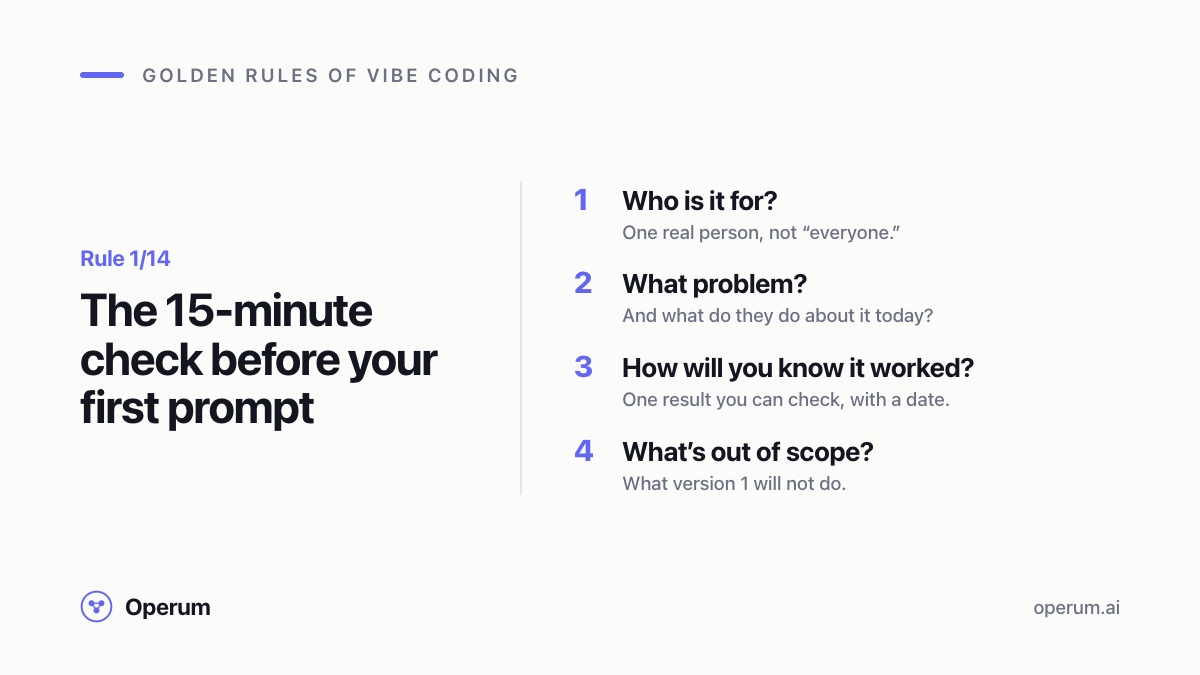
The short version, to save or share.
1. Why? (minutes 1–4) Why are you building this: to learn, to fix your own problem, or for other people? Then write the problem in one sentence. If you're building for others, also write what they do about it today: a spreadsheet, a group chat, a paid tool, or nothing. If they already have a workaround they're happy with, that's important to know before you build.
2. Who? (minutes 5–8) Who exactly has this problem? Name a real person if you can. "Busy parents" is too wide; "parents of two school-age kids who juggle three activity calendars" is something you can build for. Then talk to a few of those people, or read what they write online, and use their words, not yours.
3. What is the smallest useful solution? (minutes 9–12) What is the least you could build that would still help that person? List what the first version will not do. Then do a quick feasibility check on what you depend on: data, APIs, costs and rules.
4. How will I know it worked? (minutes 13–15) Write one thing you could check after launch, with a date. "Five clients booked through the page instead of by email by March 1." "I stopped updating the spreadsheet by hand by the end of the month." If you can't name it, you can't tell the AI what "done" means either.
A template to copy into your project
Fill in the brackets and paste it at the top of your first prompt:
For [who], who struggle with [problem].
Today they [workaround].
It worked if [result] by [date].
Not in version 1: […].
Let the AI help, but treat its answers as hypotheses
AI is good at helping with all four questions. Ask it who else might have this problem, what people use today, what could make the idea impossible, and what the smallest version could be. But its answers are hypotheses, not proof of demand. An AI can describe your perfect customer in confident detail without a single real person behind it. Check what it tells you against real people and real sources before you build on it.
How do you avoid building an app nobody uses?
Harvard Innovation Labs publishes a guide to first-time founder mistakes (a separate source from Lakhani's research). Three of its twelve mistakes are rule 1 in startup language:
- Building too soon. Building before you talk to real users risks "creating a product that no one wants." Their advice: "Delay your build. Prioritize problem discovery."
- Confusing trend with market. "A hot technology does not equal a viable company." Their advice: "Start with a specific user and a concrete use case."
- Assuming everyone is your customer. When a founder answers "Everyone" to "Who's your customer?", the guide calls it "a red flag."
And a few habits that keep you honest later:
- Re-read your "why" when you add a feature. If a new idea doesn't serve the person in your first sentence, it goes on a later list.
- Test interest before you build, when you can. A one-page site with a sign-up form can tell you whether anyone cares, before the full app exists.
What builders told us
In the Facebook group discussions that started this series, three builders raised the same theme on their own: business logic before code. One put it simply: "make proper research, gather the requirements, do a feasibility study." Before the first prompt, not after the first launch.
Mark Arkadevich has spent 15+ years in appliance service and is building a field-service Android app with AI, without being a developer. He describes builders like him as "…people like me who understand their business extremely well but aren't traditional software engineers." That's rule 1 working: he already knows the why and the who.
The "why" is also easy to lose. One builder paused his own projects to build agent "machinery" first, then wondered "how much time to invest in building the machinery before getting back to what I originally wanted to create."
Some pushed back: why not use a better or a local model instead of all this process? It's a fair question. A better model builds better, but it can't tell you who needs your app.
And one test I keep coming back to: what does your product replace in your customer's Tuesday?
What building my own client system taught me about the "why"
When I built my own client system for my photography studio, I knew exactly who it was for: me, my studio and my clients. I had years of running that studio and working with its clients behind me. That was the problem knowledge. The AI agents brought the solution knowledge. Together they gave me a working product, built around how my studio actually works, and I moved my whole studio onto it. (The full story is in The little project that became our company.)
Now the honest second half. When Alex and I decided to build Operum for founders like me, our own AI team made building it fast. It did not make finding the people who need it fast. Building faster is not the same as finding customers faster. Understanding who needs what we build, and reaching them, is still slow, human work, and we are still doing it every day.
That feels close to Lakhani's point, lived from the inside: for us, the building got cheaper; the choosing and the finding didn't.
How Operum helps you start with the "why" and the "who"
I build with Operum, the AI dev team my co-founder Alex and I make, so here is what it does for this rule today. Everything below is in the product now.
The PM interviews you before work starts. When you start a new project, and only then, Mission Control shows "Start a project" cards, and you can pick one: improve my existing project, website, CRM, mobile app, workflow automation, landing page + waitlist, internal dashboard, API / backend, browser extension, or something else. The card sends the PM agent a short brief, and the PM then:
- looks at your repository first, and builds on any code that is already there;
- interviews you in one message, with at most six questions in plain language, each with a suggested default you can just accept;
- doesn't choose a tech stack until it has your answers;
- proposes a small first version, what's in and what's out, plus the first issues, and waits for your OK before any work starts.
The questions depend on the card. The "Landing page + waitlist" card, for example, asks about the idea in one sentence, who it's for, and how you'll measure interest: rule 1, built into the first conversation.
Every piece of work starts as an issue with a "done" list, and the Architect reviews it before the Engineer builds. Your request becomes a GitHub issue, and the PM and the Architect write down what "done" means: the acceptance criteria the change has to meet. The Architect agent reviews the issue first, and only then does it move to the Engineer. Later, a separate Tester agent checks the work against that "done" list.
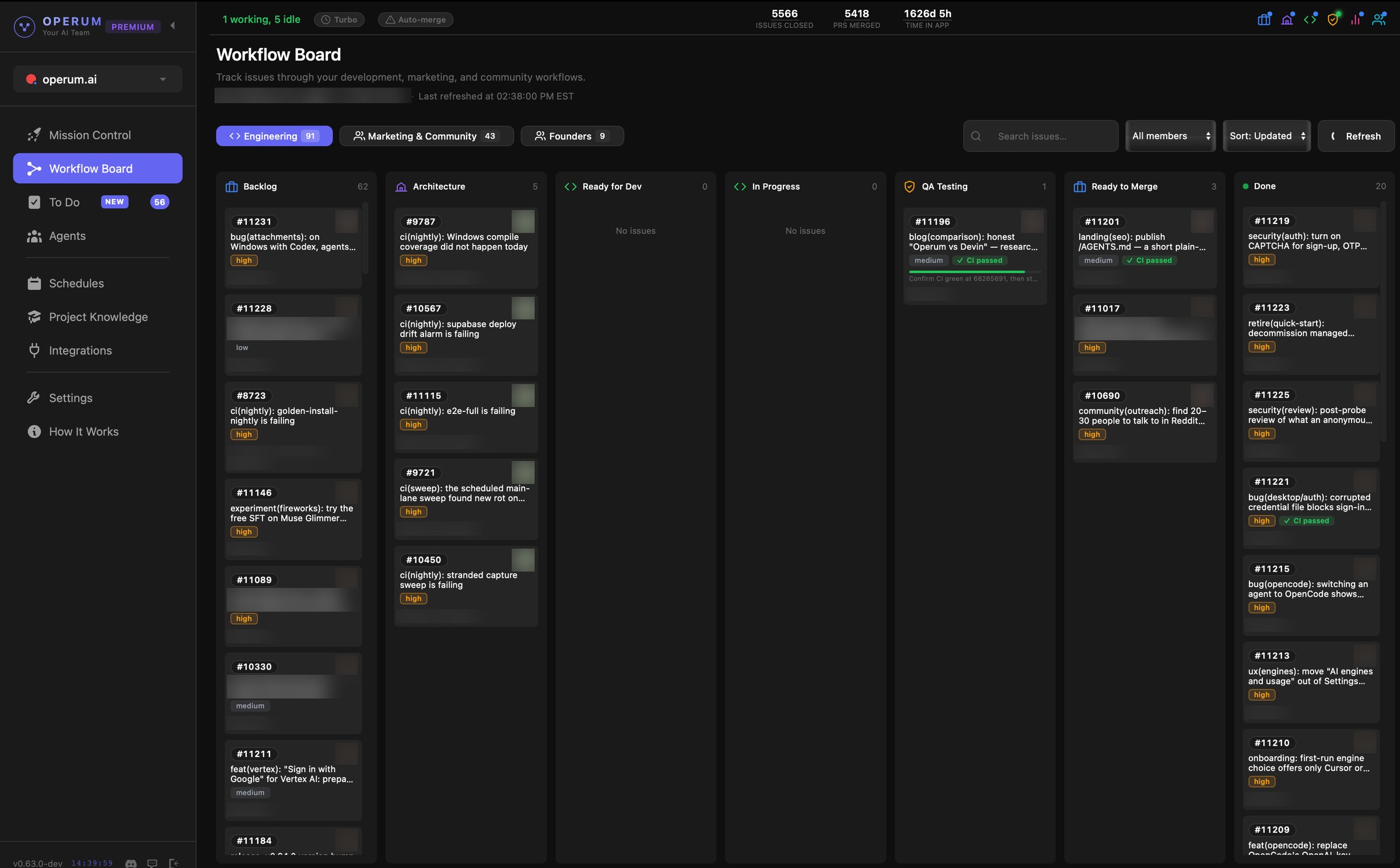
Our own Workflow Board. Architecture comes before development, so the plan is reviewed before anyone writes code.
The Marketing and Community agents help you listen before you build. The Marketing agent researches the market with you: your competitors, and what people complain about and search for. On our own team it runs a weekly competitor watch that checks competitors' pages, pricing and announcements and collects public complaints about AI coding tools. The Community agent, once you connect it to your Discord, Reddit or X account, shows you what your users are saying there. So you can shape the product and add features based on what your customers need, not on someone's good idea.
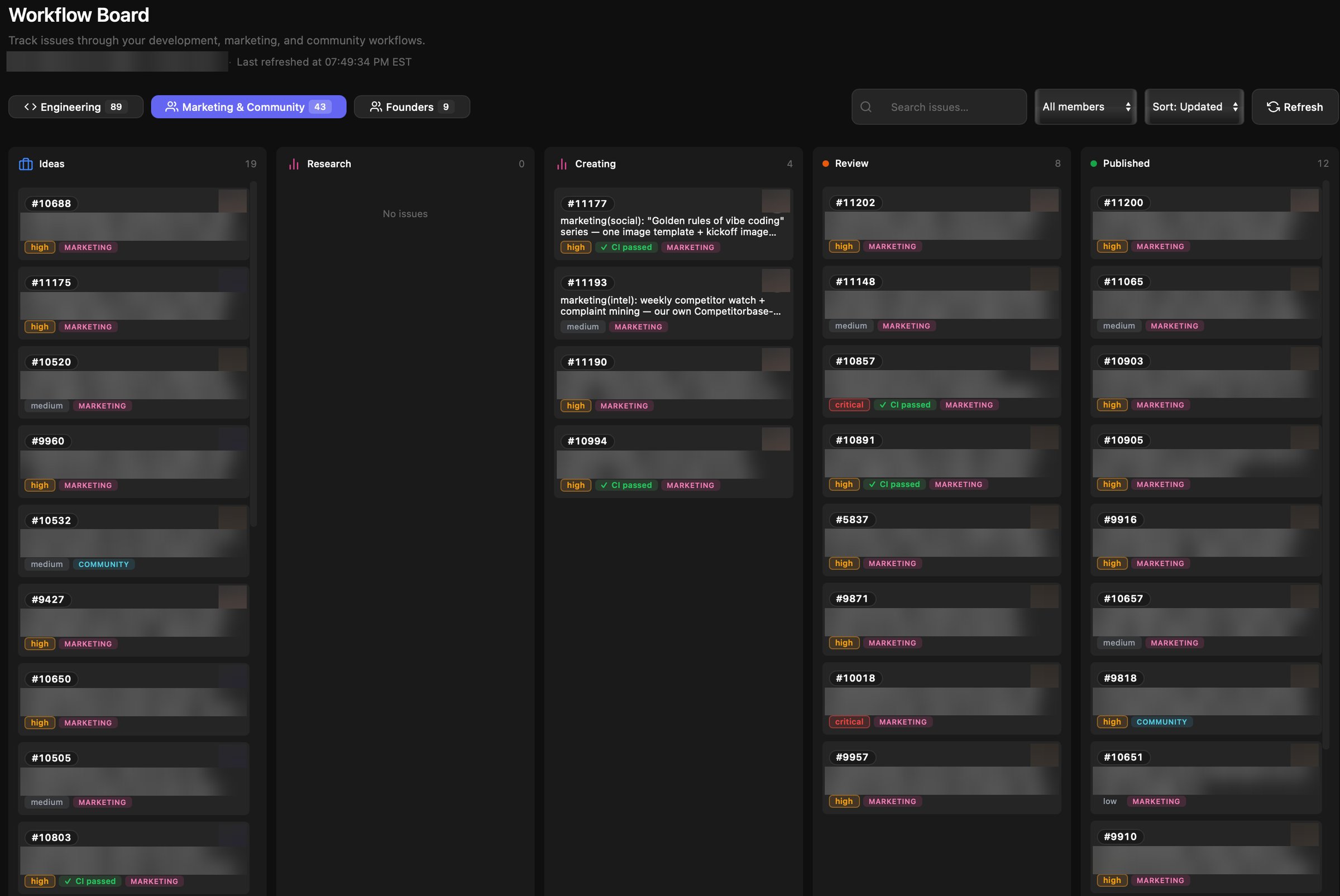
Our own Marketing & Community board. The weekly competitor watch (#11193) sits in Creating, next to this very series (#11177).
Operum helps with the "what" and the "how will I know". It can't tell you whether people need your idea; only those people can. If you want to see how the whole team checks work before it merges, I compared it honestly with Devin's AI agent teams in Devin Bots vs Operum. Plans, including the Free plan, are on our pricing page.
The 14 golden rules of vibe coding
This post is part 1. One rule a day, in this order:
- Know why you're building, and who needs it.
- Define what "correct" means before asking for code.
- Ask for evidence before accepting "done."
- Understand each change before building more on top.
- Coordinate parallel work before it overlaps.
- Put safeguards in permissions and tools, not just the prompt.
- Plan the whole journey from your machine to a real user.
- Separate the maker from the checker.
- Stay in the loop: personally test the main user journey before accepting.
- Ask questions and challenge decisions.
- Add CI as your product grows.
- Give your project a memory outside the chat.
- Watch how it's actually used once it ships.
- Make safety a gate, not a hope.
Next: rule 2, defining what "correct" means before you ask for code.
Before asking AI to build something, ask yourself whether you understand the problem well enough to recognize a good solution.
And a question for you: before your last project, did you talk to a single future user, or did you start with the first prompt?
FAQ: knowing why you're building, before you vibe code
What is the first golden rule of vibe coding?
Know why you're building, and who needs it. The easier it becomes to build, the more important it becomes to know what is worth building. Before your first prompt, answer four questions: why, who, what the smallest useful solution is, and how you'll know it worked. It is rule 1 of the 14 golden rules of vibe coding by Olga Primak, co-founder of Operum.
Why does AI build the wrong thing when I vibe code?
Because it has to guess whatever you didn't tell it. If the prompt doesn't say who the app is for and what problem it solves, the AI decides those things itself, and it can decide differently each session. Writing the "who" and the "why" down first, and pointing the AI at that file, gives it a fixed target.
Do I need customer research before vibe coding?
Only if you're building for other people. If you're vibe coding to learn, or to solve your own problem, you don't need market research; write down what "it worked" means and start. If you hope others will use or pay for it, talk to the people you're building for before you build.
What four questions should I answer before I start vibe coding?
Why am I building this? Who exactly is it for? What is the smallest useful solution? How will I know it worked? Together they take about 15 minutes. A simple template: "For [who], who struggle with [problem]. Today they [workaround]. It worked if [result] by [date]. Not in version 1: […]."
Can AI do the customer research for me?
AI can help you explore the questions: who might have the problem, what they use today, what could make the idea impossible. But its answers are hypotheses, not proof of demand. Check them against real people and real sources before you build on them.
What does Karim Lakhani say about AI and innovation?
In his July 27, 2026 talk "Democratizing Innovation, Again?", the Harvard Business School professor said: "Selection is now going to become a bottleneck." The HBS AI Institute's write-up explains that AI makes the expertise to build solutions cheaper but does not remove the need to understand users' problems, and it names reliability, evaluation and converging ideas as open questions.
How do I avoid building an app nobody uses?
Build for a specific person you can talk to, start with the smallest useful version, and test interest before you build the full app when you can, for example with a one-page site and a sign-up form. Harvard Innovation Labs lists "building too soon" and "confusing trend with market" among common first-time founder mistakes.
How does Operum help you plan before code?
In Operum, a "Start a project" card asks the PM agent to look at your repository, interview you with at most six plain-language questions, hold off on choosing a tech stack until you've answered, and propose a small first version, waiting for your OK before any work starts. Each piece of work then becomes an issue with a "done" list, and the Architect agent reviews it before the Engineer builds. The Marketing agent helps you research competitors and what people complain about and search for, and the Community agent, once you connect it to Discord, Reddit or X, shows you what your users are saying.
What are the 14 golden rules of vibe coding?
They are a 14-part series by Olga Primak, co-founder of Operum, published one rule a day starting in November 2026. Rule 1 is "Know why you're building, and who needs it." The full list is in the section above.
Sources
All read on November 22, 2026.
- HBS AI Institute, Open and User Innovation Conference 2026: Democratizing Innovation, Again?, August 18, 2026
- Microsoft WorkLab podcast, AI Is Lowering the Cost of Expertise. What Does That Mean for Business?, with Karim Lakhani, April 1, 2025
- Dell'Acqua, Ayoubi, Lifshitz, Sadun, Mollick, Mollick, Han, Goldman, Nair, Taub and Lakhani, The Cybernetic Teammate: A Field Experiment on Generative AI Reshaping Teamwork and Expertise, NBER Working Paper 33641, April 2025
- Harvard Innovation Labs, First-Time Founder Mistakes


