
Part 5 of 14 in my series, Golden rules of vibe coding. Published November 26, 2026. Part 1: Know why you're building, and who needs it. Part 2: Define what "correct" means before asking for code. Part 3: Ask for evidence before accepting "done". Part 4: Understand each change before building more on top.
Rule 5, in short: more AI sessions running at once doesn't automatically mean more progress. Before two pieces of work start at the same time, decide who touches what. Write down which files, screens and data each task will change. Run tasks in parallel only when they don't overlap, and do the ones that share a file in order. Then merge one at a time, and check the product after each merge. Each piece of work can look correct on its own and still disagree with the other once they're combined.
The problem: each piece of work looks fine, until you put them together
AI makes it easy to open a second session, a third tab, another agent. One adds discount codes, another adds sales tax, a third redesigns the cart. Each one finishes, each one says "done", and each one's tests pass.
Then you merge them. The same file was changed twice, in two different ways. One session assumed the discount comes off before tax, the other assumed after. Git may even combine the two without complaint, and the product still disagrees with itself.
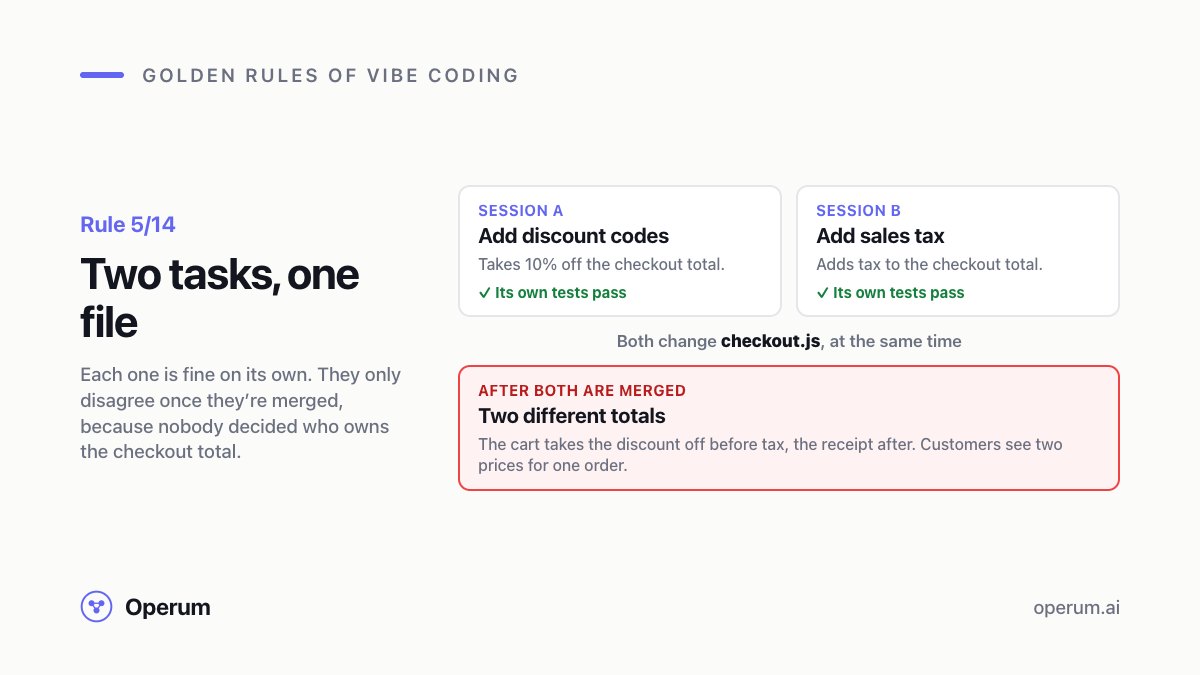
An illustration, not a real project: each session did its job, and nobody decided who owns the checkout total.
Software teams have a name for the worst version of this. Martin Fowler calls it a semantic conflict: "When the two get merged, the textual merge will work fine, but the program will not run the same way." And he warns that "semantic conflicts are harder to spot and harder to fix."
There is a human cost too. Simon Willison, co-creator of the Django web framework, runs several coding agents at once. At the Pragmatic Summit (his write-up) he described it: "I often have three projects that I'm working on at once because then if something takes 10 minutes I can switch to another one and after two hours of that I'm done for the day. I'm mentally exhausted." In an earlier post he named the limit: "AI-generated code needs to be reviewed, which means the natural bottleneck on all of this is how fast I can review the results."
Here are the questions vibe coders ask about this, with answers you can use today, with any AI tool.
How is this different from understanding each change (rule 4)?
Rule 4 is about one change at a time: understand it before you build on it. Rule 5 is about several changes in flight at once: decide who touches what before they start.
Rule 4 alone doesn't save you here. You can understand session A's change perfectly, and session B's change perfectly, and still miss what happens when both land in the same file. The conflict isn't inside either change. It's between them, and the cheapest place to catch it is before either one starts.
Why do two AI sessions conflict when each one works?
Because each session only sees its own task. Session A doesn't know session B exists, and neither knows what the other assumed. Each checks its own work against its own goal, so each one passes.
Fowler explains why merging later makes it worse. On feature branches, "two people, working on different feature branches, do not integrate their work until the second one merges their work into the common codebase." The isolation feels safe, "However this isolation does prevent early detection of problems."
Builders describe the same thing with AI agents. Under the launch of one AI tool that runs several coding agents for you, one reply on X made the point: each pull request can look correct on its own while the combined system disagrees with itself, and putting the pieces together is the hard part.
Don't git worktrees solve this?
They solve part of it, and it's the answer experienced developers give first, for good reason.
A git worktree is a second working copy of the same project. In the words of the git documentation: "A git repository can support multiple working trees, allowing you to check out more than one branch at a time." So two AI sessions can each have their own copy of the files, and they won't overwrite each other's edits while they work. If you run several sessions, use worktrees (or separate copies of the project). Willison does the same thing his own way: "if I want to run two agents in isolation against the same repo I do a fresh checkout".
What worktrees don't do is decide who owns what. They keep the work apart while it happens. They don't stop two tasks from changing the same file, or from making opposite assumptions about the same data. That shows up later, when you bring the work back together, which is exactly the merge Fowler describes. Isolation is the first half. Coordination is the second.
Will more AI agents get my project done faster?
Sometimes. Often not as much as you'd expect, and coding is one of the harder cases.
Anthropic built a system where several AI agents research a question in parallel, and wrote up what they learned in How we built our multi-agent research system (June 2025). Two findings matter here:
- On coordination: "Without detailed task descriptions, agents duplicate work, leave gaps, or fail to find necessary information." Their fix: "Each subagent needs an objective, an output format, guidance on the tools and sources to use, and clear task boundaries."
- On coding specifically: "For instance, most coding tasks involve fewer truly parallelizable tasks than research, and LLM agents are not yet great at coordinating and delegating to other agents in real time."
It also costs more. In Anthropic's data from that research system, "multi-agent systems use about 15× more tokens than chats." Your numbers will differ, but more agents means more AI usage to pay for.
Anthropic's general advice, in Building effective agents (December 2024), is to start small: "we recommend finding the simplest solution possible, and only increasing complexity when needed."
And there's you. Every parallel session produces work someone has to check, and that someone is you. If you can review two changes carefully in an afternoon, running six sessions doesn't make you six times faster. It gives you four changes nobody has looked at.
When is it safe to run AI tasks in parallel?
When the tasks are truly independent: they don't change the same files, the same data, or the same rules.
In Building effective agents, Anthropic describes the safe kind of parallel work as "Breaking a task into independent subtasks run in parallel." The key word is independent. A quick test before you start two sessions:
- Different files? A new "About us" page and a fix to the sign-in email: usually fine in parallel.
- Same file, same data or same rule? Discount codes and sales tax both change the checkout total: do them in order.
- Not sure? Ask each session to list what it will change before it starts (the prompt is below), and compare the two lists.
How long should parallel work run before I merge it?
Short. The longer two pieces of work stay apart, the more they drift.
Fowler again: "A team that typically completes features in a day or two are able to integrate frequently enough to avoid the problems of delayed integration. Teams that take weeks, or months, to complete a feature will run into more of these difficulties." The trunk-based development guide puts a number on it: "Simply put, the branch should only last a couple of days." And it applies the rule to AI directly: "Count concurrent writers (humans and agents) and the peak commit frequency instead." Each agent counts, the same as a developer.
The DORA research program's guide to working in small batches gives the reason: "Smaller changes are easier to review, merge, and roll back."
For a vibe coder, that means a parallel task should be measured in hours, not weeks. Merge it, check it, and start the next one from the updated project.
Your toolkit: the 10-minute coordination check
Do this before you start a second session, agent or tab on the same project.
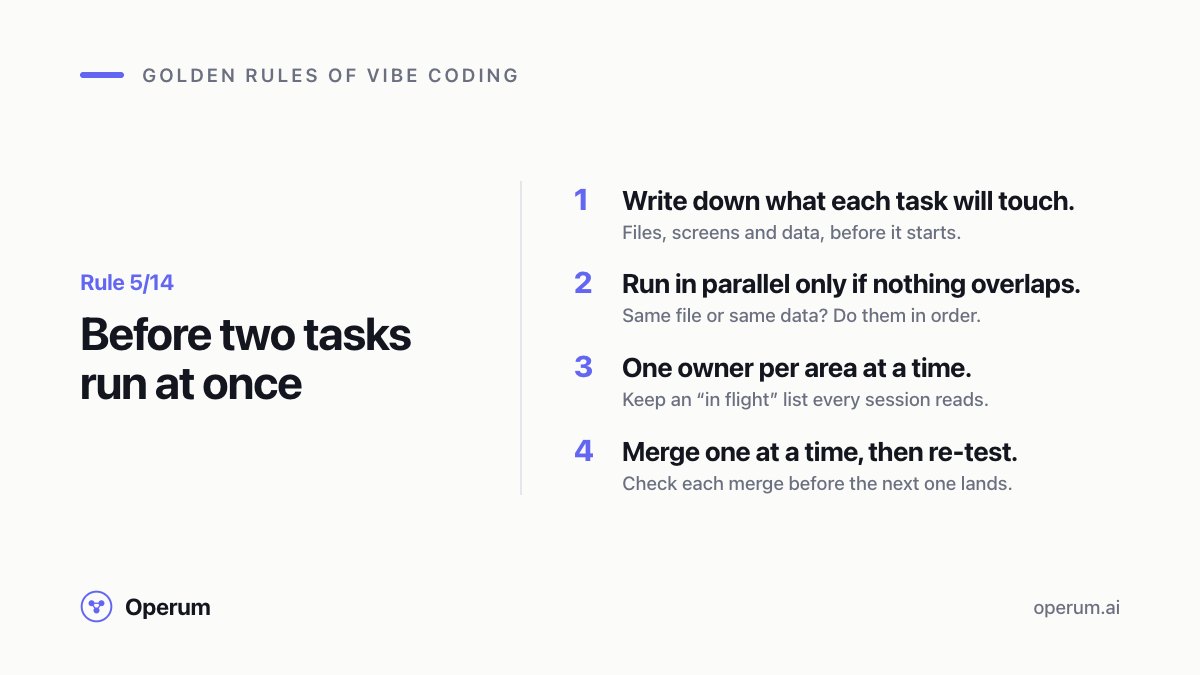
The checklist, to save or share.
1. Write down what each task will touch. (minutes 1–4) Before a session writes any code, ask it to list the files, screens and data it expects to change. You don't need to understand every file name. You need to see whether two lists overlap.
2. Compare, and decide the order. (minutes 5–6) If two lists share a file, a screen, a database table or a rule (prices, permissions, sign-in), don't run them at the same time. Do one first, merge it, then start the other from the updated project.
3. Keep an "in flight" list. (minutes 7–8) One short notes file in your project: what's being worked on right now, by which session, and which areas it owns. Every session reads it at the start. One owner per area at a time.
4. Merge one at a time, and check after each. (minutes 9–10, after the work is done) Merge the first finished task, check the main things your users do, then merge the next. If something breaks, you know which merge did it. That's rule 3's evidence, one merge at a time.
A prompt to copy
Paste this at the start of each parallel session:
Before you start, don't write any code yet. First:
- List the files, screens and data you expect to change for this task.
- Read the "in flight" notes file. Check your list against the work already in progress there.
- If anything overlaps (same file, same data, same rule like prices, permissions or sign-in), stop and tell me what overlaps instead of starting.
- If nothing overlaps, add this task and its areas to the "in flight" file, then start.
- Only change the files on your list. If you need to change something else, ask me first.
When you finish, tell me exactly which files you changed, so I can compare them with your list.
When you notice X, do Y
| When you notice… | Do this |
|---|---|
| Two tasks need the same file or the same data. | Do them in order, not in parallel. |
| A session changed files that weren't on its list. | Ask why before you merge anything. |
| A merge shows conflicts. | Stop. Merge one task, check it, then redo the other from the updated project. |
| Each task passes alone, but something is off after both merged. | Check the rules both touched (prices, permissions). That's a conflict in meaning, not in text. |
| A task has been running for days. | Merge what's ready, or restart it from the current project. |
| You can't keep track of what's running. | Run fewer sessions. Your review time is the real limit. |
How Operum takes care of it
I build with Operum, the AI dev team my co-founder Alex and I make. Here is what it does for this rule today, and what it doesn't. Everything below is in the product now.
| The step you'd do by hand | What Operum does |
|---|---|
| Give each session its own copy of the project | Each agent works in its own isolated git worktree |
| One owner per area, an "in flight" list | The PM decides what goes to which agent, and an agent already working on one issue isn't handed another automatically |
| Run fewer things at once than you think | How many pull requests can be in full CI at the same time is a team setting, capped by your plan; lightweight ones are outside that limit |
| Check each change before it lands | In the standard engineering workflow, each change is a pull request linked to its issue, and it can't merge without a separate Tester's approval |
| Don't touch someone else's work | On a shared repository, agents can't change another founder's issues or pull requests |
Each agent has its own copy of the project. Operum gives every agent its own git worktree, the same isolation the worktrees section above recommends. Agents don't overwrite each other's files while they work. Like any worktree, though, this keeps the work apart; it can't stop two changes from conflicting in meaning once they're merged.
The PM decides what runs, and waits when it's full. By default, when new work is ready, the PM agent checks the gates before it hands anything to the Engineer. If an agent is already working on a different issue, the new task isn't pushed on top of it. It's offered again on a later pass, once the agent is free. Here's a real dispatch example from our team's activity: the PM checked the gates, found the full-CI lane already in use (1 of 1), and didn't start the Engineer.
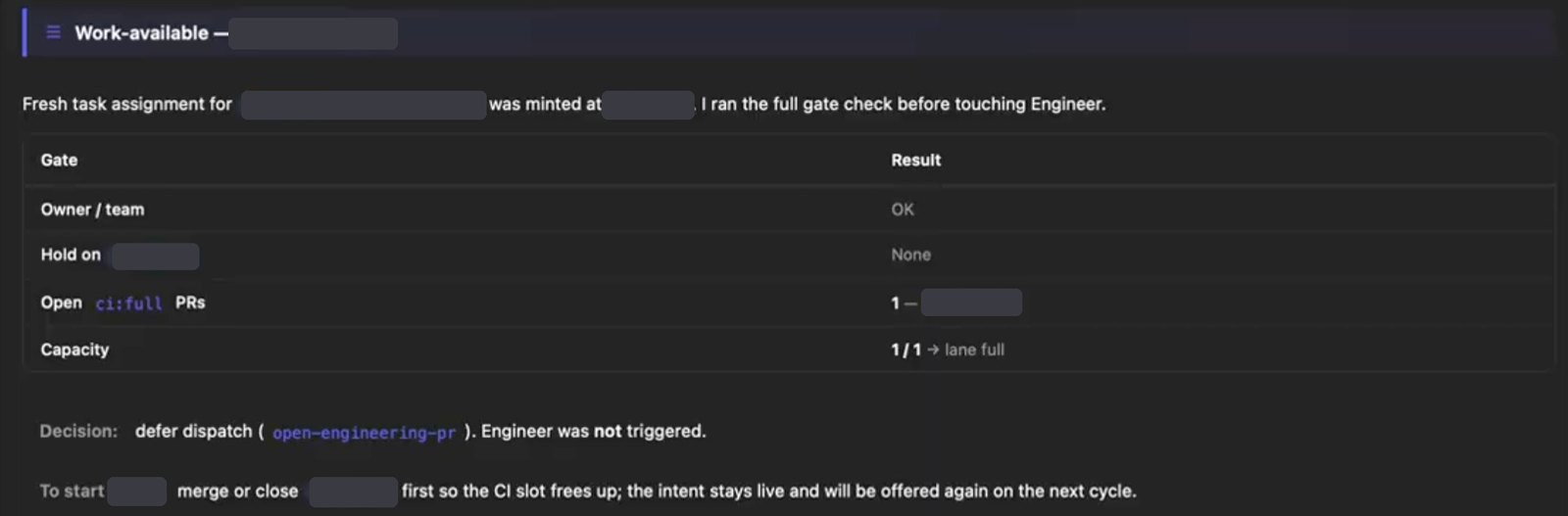
A real dispatch example from our team's activity, with identifiers redacted: the lane was full, so the next task waited instead of starting alongside it.
You choose how much runs at once. How many pull requests can be in Operum's full CI checks at the same time is a team setting, capped by your plan: one feature at a time on Free, up to three on Standard and six on Premium (see pricing). Lightweight pull requests, such as blog or docs updates, are outside that limit. Alex explains why we lean towards fewer, in Why sequential PRs beat parallel pipelines.
One issue, one pull request, checked before it merges. In the standard engineering workflow, agents are instructed to deliver each issue as one pull request, and Operum's merge gate refuses a pull request that targets an issue without being linked to it. It also refuses to merge it without a recorded approval from a separate Tester. That doesn't mean every change merges one after another: lightweight pull requests, and on paid plans several full-CI ones, can be in flight at once. Each one is still checked before it lands. The Workflow Board shows where each one is.
Other people's work stays theirs. On a shared repository, Operum's tools refuse to change an issue or pull request that belongs to another founder. Reading it is allowed; changing it isn't. How teams and projects work in Operum is on the Teams page.
What Operum doesn't do yet: it doesn't compare the files two tasks plan to change before they start. It prevents collisions by limiting how much runs at once and keeping each agent's work separate, not by predicting overlap. So the "write down what each task will touch" step above is still worth doing, in Operum too. And complex work shows how Operum plans before anything is written.
The two changes that collided over one shared file
This happened on our own team, building Operum, in August 2026.
Our agents keep a few shared log files in the project, records that only ever grow: an agent adds a line when certain things happen, and no line is ever supposed to be removed. Two pull requests were open at the same time. They were about completely different things, but both had added a line to the same log.
The moment the first one merged, GitHub marked the second as conflicted, so it couldn't merge. The only file the two shared was that log. Our Engineer filed an issue about it and pointed out that this wasn't bad luck: any two pull requests open at the same time that both added to the log would conflict, every time.
The log had already cost us once. On an earlier pull request, the file had been "fixed" by writing back an older copy of it, and three earlier entries were silently destroyed. Nothing failed. The checks were green. It was caught only because QA read a commit that had been labelled "unrelated".
So the obvious fix for the conflict, resolving it by hand, was exactly the kind of edit that had already lost entries.
How it ended
We didn't ask agents to be more careful. We changed how the logs work, in steps, and the first step wasn't enough:
- First, we changed how these logs merge. They're now marked in the project so git merges them by keeping the lines from both sides. That merge can never drop a line, and on our own machines the conflict went away. But GitHub's check for whether a pull request can merge doesn't use that local setting, so pull requests that touched the same log still showed up as conflicted there.
- Then we removed the shared file. For the busiest log, every new entry now goes into its own small file instead of being added to one shared file. Two pull requests no longer write to the same file, so this collision is gone, on GitHub too.
- And a CI check now catches deletions. It goes red if a change to one of these logs removes anything, so a "fix" like the one that lost three entries is caught before it merges.
That fixed this collision, for these logs and for agents adding entries at the same time. It doesn't mean two changes can never conflict anywhere else in the project.
Why it matters for this rule: two unrelated pieces of work were each fine on their own. They collided because they shared one file nobody owned. The fix wasn't to work slower. It was to decide, for that file, how parallel work combines, and then to stop sharing it. Your project is smaller, but the shape is the same: find the files every task touches, and decide in advance how they're shared.
What builders told us
In the conversations behind this series, builders kept describing the same pattern: parallel work feels fast while it's running, and the cost shows up when it comes back together.
- In a Facebook group for Claude Code and OpenCode builders, one member who builds their own AI coding tool said that running tasks in parallel leads to overlapping pull requests and painful rebasing.
- Under a LinkedIn post about an AI tool that runs coding agents for you, one comment pointed out that branches drifting apart locally aren't caught before the pull request is pushed.
- In our own competitor research, one new open-source tool is a session manager built for exactly this: running many AI agent sessions side by side.
- Memphis DerekParker York, who shared his process in rule 2, made the same point there: adding more agents doesn't help unless each one clearly understands the work.
The 14 golden rules of vibe coding
This post is part 5. One rule a day, in this order:
- Know why you're building, and who needs it.
- Define what "correct" means before asking for code.
- Ask for evidence before accepting "done."
- Understand each change before building more on top.
- Coordinate parallel work before it overlaps.
- Put safeguards in permissions and tools, not just the prompt.
- Plan the whole journey from your machine to a real user.
- Separate the maker from the checker.
- Stay in the loop: personally test the main user journey before accepting.
- Ask questions and challenge decisions.
- Add CI as your product grows.
- Give your project a memory outside the chat.
- Watch how it's actually used once it ships.
- Make safety a gate, not a hope.
Next: putting safeguards in permissions and tools, not just the prompt.
The next time you're about to open a second AI session, ask the first one a question: which files are you changing right now?
And a question for you: how many AI sessions do you run at once, and what was the last thing two of them disagreed about?
FAQ: running parallel AI agents without conflicts
What is the fifth golden rule of vibe coding?
Coordinate parallel work before it overlaps. Before two AI sessions or agents work on the same project at the same time, decide who touches what: list the files, screens and data each will change, run in parallel only when nothing overlaps, and merge one at a time. It is rule 5 of the 14 golden rules of vibe coding by Olga Primak, co-founder of Operum.
Can I run multiple Claude Code sessions on the same repo?
Yes, but give each its own copy of the project, such as a git worktree, so they don't overwrite each other's files. Then make sure they don't change the same files or the same data at the same time, and merge their work one at a time, checking the product after each merge.
Why do parallel AI agents cause merge conflicts?
Each agent only sees its own task, so two agents can change the same file in different ways, or make opposite assumptions about the same data. Martin Fowler calls the second kind a semantic conflict: the text merges cleanly, "but the program will not run the same way." The longer the work stays apart, the more it drifts.
Do git worktrees prevent AI agents from conflicting?
They prevent one kind. A worktree gives each session its own working copy, so agents don't overwrite each other's edits while they work. They don't stop two tasks from changing the same file or the same rule, which shows up when you merge. Worktrees isolate the work; you still need to coordinate who owns what.
Is it faster to run more AI coding agents at once?
Only for truly independent work. Writing about its multi-agent research system, Anthropic says that "most coding tasks involve fewer truly parallelizable tasks than research," and in its data from that system, multi-agent setups used about 15 times more tokens than chats. Your own review time is also a limit: more sessions produce more changes than you can check.
How do I avoid merge conflicts when vibe coding?
Ask each session to list what it will change before it starts, and compare the lists. Do overlapping tasks in order, keep a short "in flight" notes file every session reads, keep each task short-lived, and merge one at a time with a check after each merge.
How long should an AI coding task run before I merge it?
Hours, not weeks. Fowler notes that teams finishing features "in a day or two" avoid the problems of delayed integration, and the trunk-based development guide says a branch "should only last a couple of days." Merge, check, and start the next task from the updated project.
What is the difference between rule 4 and rule 5?
Rule 4, understand each change before building on it, is about one change at a time. Rule 5 is about several changes in flight at once: two changes can each be understood and correct, and still conflict once combined, so decide who touches what before they start.
How does Operum handle parallel work?
Each Operum agent works in its own git worktree, which keeps files apart while agents work but can't prevent conflicts in meaning. By default the PM decides what runs, doesn't hand a busy agent a second task automatically, and waits when the full-CI limit is reached. How many pull requests can be in full CI at once is a team setting capped by your plan: one on Free, up to three on Standard and six on Premium; lightweight pull requests are outside that limit. In the standard engineering workflow, a pull request can't merge without a separate Tester's approval. Operum doesn't compare file lists between tasks before they start.
What are the 14 golden rules of vibe coding?
They are a 14-part series by Olga Primak, co-founder of Operum, published one rule a day starting in November 2026. Rule 1 is "Know why you're building, and who needs it." Rule 2 is "Define what 'correct' means before asking for code." Rule 3 is "Ask for evidence before accepting 'done.'" Rule 4 is "Understand each change before building more on top." Rule 5 is "Coordinate parallel work before it overlaps." The full list is in the section above.
Sources
All read on November 26, 2026.
- Martin Fowler, Semantic Conflict, martinfowler.com, August 4, 2011
- Martin Fowler, Feature Branch, martinfowler.com, May 7, 2020
- Anthropic, How we built our multi-agent research system, June 13, 2025
- Anthropic, Building effective agents, December 19, 2024 (the page notes that much of the tooling it describes has changed since)
- Simon Willison, My fireside chat about agentic engineering at the Pragmatic Summit, simonwillison.net, March 14, 2026
- Simon Willison, Embracing the parallel coding agent lifestyle, simonwillison.net, October 5, 2025
- Git documentation, git-worktree
- Trunk Based Development, Short-Lived Feature Branches
- DORA, Working in small batches


